Search This Blog

Showing posts with label Oracle 11gr2. Show all posts

Monday, January 16, 2012

ORA-00600 + [kqlidchg0]

Today i saw below error message on my alert log files
Mon Jan 16 08:34:12 2012
Use ADRCI or Support Workbench to package the incident.
See Note 411.1 at My Oracle Support for error and packaging details.
Errors in file D:\APP\ADMINISTRATOR\diag\rdbms\fakpropr\fakpropr\trace\fakpropr_ora_3244.trc  (incident=72644):
ORA-00603: ORACLE server session terminated by fatal error
ORA-00600: internal error code, arguments: [kqlidchg0], [], [], [], [], [], [], [], [], [], [], []
ORA-00604: error occurred at recursive SQL level 1
ORA-00001: unique constraint (SYS.I_PLSCOPE_SIG_IDENTIFIER$) violated

Clause:
There are dependent objects in an invalid state.

Solution:
Please run the following query and review the results.
SQL> SET LINESIZE 100
SQL> SELECT object_id, object_name, object_type, owner, status 
     FROM   dba_objects 
     WHERE  object_name IN (SELECT symrep 
                            FROM   plscope_identifier$ 
                            WHERE  obj# IN (SELECT obj# 
                                            FROM   plscope_identifier$ 
                                            MINUS  
                                            SELECT object_id 
                                            FROM   dba_objects));

2.  Drop the invalid objects.
3.  Purge the recyclebin to clear the dropped objects.
4.  Drop the table that was failing to drop.

Sunday, September 25, 2011

/sqlplus: error while loading shared libraries: /db/product/11.2.0/dbhome_1/lib/libclntsh.so.11.1: cannot restore segment prot after reloc Permission Denied

when i try to login to sqlplus on 11g installed on linux OS.

get below error
[oracle@orapd bin]$ ./sqlplus / as sysdba
./sqlplus: error while loading shared libraries: /db/product/11.2.0/dbhome_1/lib/libclntsh.so.11.1: cannot restore segment prot after reloc: Permission denied

solution:
1. login with root user and execute below command
[oracle@orapd bin]$ su root
Password:
[root@orapd bin]#  /usr/sbin/setenforce 0
[root@orapd bin]# exit
exit
[oracle@orapd bin]$ ./sqlplus / as sysdba

SQL*Plus: Release 11.2.0.1.0 Production on Fri Sep 23 20:07:58 2011

Copyright (c) 1982, 2009, Oracle.  All rights reserved.

Connected to an idle instance.

SQL>

Sunday, September 18, 2011

How to configure SYSLOG auditing in 11gr2

How to configure SYSLOG auditing in 11gr2

Step:
1. LOGON TO DB WITH sysdba user and set the following parameters
alter system set audit_trail=OS scope=spfile;

2. create pfile from spfile
create pfile from spfile;

3. shutdown database
shutdown immediate;

4. add the following lines in the pfile.
AUDIT_SYSLOG_LEVEL=local1.warning
see more info about audit_syslog_level parameter here
5. logon to the computer that contain /etc/syslog.conf file with superuser (root)

6. add the audit file destination in syslog configuration file (syslog.conf)

for eg: local1.warning /var/log/audit.log

7. restart syslog logger
$/etc/rc.d/init.d/syslog restart

8. conn to database with sysdba user
conn / as sysdba

9. create spfile from pfile;
create spfile from pfile;

10.  startup database
startup

Benefits of enabling syslog audit
1. normal database sys audit files (.aud) can be edited by root user or any one who has access to that files., to provide more security to OS .aud file we should enabled the syslog audit.

read more here
SQL> conn / as sysdba
Connected.
SQL> alter system set audit_trail=OS scope=spfile;

System altered.

SQL> create pfile from spfile;

File created.

SQL> shutdown immediate
Database closed.
Database dismounted.
ORACLE instance shut down.
SQL> --adding the audit_syslog_level parameter in pfile
SQL> host vi /db/product/11.2.0/dbhome_1/dbs/initORAMFE.ora

SQL> --logon with root user and add the line in syslog.conf file
SQL> host su root
Password:
[root@recovery bin]# vi /etc/syslog.conf
[root@recovery bin]# /etc/rc.d/init.d/syslog restart
Shutting down kernel logger:                               [  OK  ]
Shutting down system logger:                               [  OK  ]
Starting system logger:                                    [  OK  ]
Starting kernel logger:                                    [  OK  ]
[root@recovery bin]# exit
exit

SQL> --now create new spfile with edited pfile
SQL> create spfile from pfile;

File created.

SQL> startup
ORACLE instance started.

Total System Global Area 2042241024 bytes
Fixed Size                  1337548 bytes
Variable Size             939525940 bytes
Database Buffers         1090519040 bytes
Redo Buffers               10858496 bytes
Database mounted.
Database opened.
SQL> host tail -10 /var/log/audit.log
tail: cannot open `/var/log/audit.log' for reading: Permission denied

SQL> host su root
Password:
[root@recovery bin]# tail -5 /var/log/audit.log
Sep 19 00:46:18 recovery Oracle Audit[13501]: LENGTH : '148' ACTION :[7] 'CONNEC                                                                             T' DATABASE USER:[1] '/' PRIVILEGE :[6] 'SYSDBA' CLIENT USER:[6] 'oracle' CLIENT                                                                              TERMINAL:[5] 'pts/0' STATUS:[1] '0' DBID:[0] ''
Sep 19 00:46:18 recovery Oracle Audit[13501]: LENGTH : '424' ACTION :[281] 'SELE                                                                             CT DECODE(null,'','Total System Global Area','') NAME_COL_PLUS_SHOW_SGA,   SUM(V                                                                             ALUE), DECODE (null,'', 'bytes','') units_col_plus_show_sga FROM V$SGA    UNION                                                                              ALL    SELECT NAME NAME_COL_PLUS_SHOW_SGA , VALUE,    DECODE (null,'', 'bytes','                                                                             ') units_col_plus_show_sga FROM V$SGA' DATABASE USER:[1] '/' PRIVILEGE :[6] 'SYS                                                                             DBA' CLIENT USER:[6] 'oracle' CLIENT TERMINAL:[5] 'pts/0' STATUS:[1] '0' DBID:[0                                                                             ] ''
Sep 19 00:48:01 recovery Oracle Audit[13501]: LENGTH : '175' ACTION :[22] 'ALTER                                                                              DATABASE   MOUNT' DATABASE USER:[1] '/' PRIVILEGE :[6] 'SYSDBA' CLIENT USER:[6]                                                                              'oracle' CLIENT TERMINAL:[5] 'pts/0' STATUS:[1] '0' DBID:[10] '3012735072'
Sep 19 00:48:01 recovery Oracle Audit[13572]: LENGTH : '159' ACTION :[7] 'CONNEC                                                                             T' DATABASE USER:[1] '/' PRIVILEGE :[6] 'SYSDBA' CLIENT USER:[6] 'oracle' CLIENT                                                                              TERMINAL:[5] 'pts/0' STATUS:[1] '0' DBID:[10] '3012735072'
Sep 19 00:48:39 recovery Oracle Audit[13572]: LENGTH : '172' ACTION :[19] 'ALTER                                                                              DATABASE OPEN' DATABASE USER:[1] '/' PRIVILEGE :[6] 'SYSDBA' CLIENT USER:[6] 'o                                                                             racle' CLIENT TERMINAL:[5] 'pts/0' STATUS:[1] '0' DBID:[10] '3012735072'
[root@recovery bin]#


Saturday, September 17, 2011

Enable auditing for SYSDBA (sys) user in 11gr2

Database security is one of the major and important task for DBA's. ,
this article is basic of enabling auditing for SYS administrative user.

1. How to enable AUDIT for sys administrative user.

Step:
1. logon to database with sysdba user
2. set AUDIT_SYS_OPERATIONS parameter (mandatory) to TRUE
default value of this parameter is FALSE
This parameter is static means we required to bounce DATABASE to take effect of this parameter value.

3. set AUDIT_TRAIL parameter as per desired value.
default value of this parameter is none

4. set AUDIT_FILE_DEST = location path for audit records log file 
default value of this parameter %ORACLE_BASE%/ORACLE_SID/adump
IF AUDIT_FILE_DEST parameter doesn't set or not point to valid directory then oracle will create audit file in %ORACLE_HOME%/rdbms/audit directory.

5. restart database

6. Setting the size or age of the operating system audit files


Example:
[oracle@recovery bin]$ ./sqlplus / as sysdba

SQL*Plus: Release 11.2.0.1.0 Production on Sat Sep 17 21:46:36 2011

Copyright (c) 1982, 2009, Oracle.  All rights reserved.


Connected to:
Oracle Database 11g Enterprise Edition Release 11.2.0.1.0 - Production
With the Partitioning, OLAP, Data Mining and Real Application Testing options

SQL> alter system set audit_sys_operations=TRUE scope=spfile;

System altered.

SQL> alter system set audit_trail='DB' scope=spfile;

System altered.

SQL> alter system set audit_file_dest='/db/admin/oramfe/adump/' scope=spfile;

System altered.

SQL> shutdown immediate
Database closed.
Database dismounted.
ORACLE instance shut down.

SQL> startup
ORACLE instance started.

Total System Global Area 2042241024 bytes
Fixed Size                  1337548 bytes
Variable Size             973080372 bytes
Database Buffers         1056964608 bytes
Redo Buffers               10858496 bytes
Database mounted.
Database opened.
SQL> host ls -lrt /db/admin/oramfe/adump/
total 32
-rw-rw---- 1 oracle oracle 2585 Sep 17 21:48 oramfe_ora_12487_1.aud
-rw-rw---- 1 oracle oracle  750 Sep 17 21:48 oramfe_ora_12500_2.aud
-rw-rw---- 1 oracle oracle 1451 Sep 17 21:50 oramfe_ora_12602_1.aud
-rw-rw---- 1 oracle oracle  980 Sep 17 21:51 oramfe_ora_12671_1.aud

SQL> host cat /db/admin/oramfe/adump/oramfe_ora_12671_1.aud
Audit file /db/admin/oramfe/adump/oramfe_ora_12671_1.aud
Oracle Database 11g Enterprise Edition Release 11.2.0.1.0 - Production
With the Partitioning, OLAP, Data Mining and Real Application Testing options
ORACLE_HOME = /db/product/11.2.0/dbhome_1/
System name:    Linux
Node name:      recovery.fakhruddin.local
Release:        2.6.18-53.el5
Version:        #1 SMP Wed Oct 10 16:34:02 EDT 2007
Machine:        i686
Instance name: oramfe
Redo thread mounted by this instance: 1
Oracle process number: 20
Unix process pid: 12671, image: oracle@recovery.fakhruddin.local (TNS V1-V3)

Sat Sep 17 21:50:07 2011 +04:00
LENGTH : '160'
ACTION :[7] 'CONNECT'
DATABASE USER:[1] '/'
PRIVILEGE :[6] 'SYSDBA'
CLIENT USER:[6] 'oracle'
CLIENT TERMINAL:[5] 'pts/0'
STATUS:[1] '0'
DBID:[10] '3012735072'

Sat Sep 17 21:51:21 2011 +04:00
LENGTH : '173'
ACTION :[19] 'ALTER DATABASE OPEN'
DATABASE USER:[1] '/'
PRIVILEGE :[6] 'SYSDBA'
CLIENT USER:[6] 'oracle'
CLIENT TERMINAL:[5] 'pts/0'
STATUS:[1] '0'
DBID:[10] '3012735072'

On windows platform the audit records will captured in the event viewer log file.

start --->> control penals >>> administrative tools >>> event viewer >>>> application log


Thursday, September 15, 2011

ORA-00845 When Starting Up An 11g Instance

Today when i trying to connect 11g (newly installed software) and trying to startup 11g database then got below error message

SQL> STARTUP
ORA-00845: MEMORY_TARGET not supported on this system

Reason:
This feature requires the /dev/shm file system to be mounted for at least %llu bytes.
/dev/shm is either not mounted or is mounted with available space less than this size.

Explanation:

AMM (Automatic Memory Management) is a new feature in 11 which manages both SGA and PGA.

MEMORY_TARGET is used instead of SGA_TARGET and MEMORY_MAX_TARGET is used instead of SGA_MAX_SIZE (defaults to MEMORY_TARGET ).

It uses /dev/shm on Linux. If max_target set over /dev/shm size, you get the error messages.


Solution:
1. If you are installing Oracle 11g on a Linux system, note that Memory Size (SGA and PGA), which sets
the initialization parameter MEMORY_TARGET or MEMORY_MAX_TARGET, cannot be greater than the shared memory filesystem (/dev/shm) on your operating system. To resolve the current error, increase the /dev/shm file size. For example:
# mount -t tmpfs shmfs -o size=7g /dev/shm
Also, to make this change persistent across system restarts, add an entry in /etc/fstab similar to the following:

shmfs /dev/shm tmpfs size=7g 0
2. This error may also occur if /dev/shm is not properly mounted. Make sure your df output is similar to the following:

$ df -k
Filesystem 1K-blocks Used Available Use% Mounted on
...
shmfs 6291456 832356 5459100 14% /dev/shm
3. If configuring AMM is not possible due to lack of space on /dev/shm mount point, you can configure ASMM instead of AMM, i.e. set SGA_TARGET, SGA_MAX_SIZE and PGA_AGGREGATE_TARGET instead of MEMORY_TARGET.

Reference- 1
Reference - 2

Wednesday, September 14, 2011

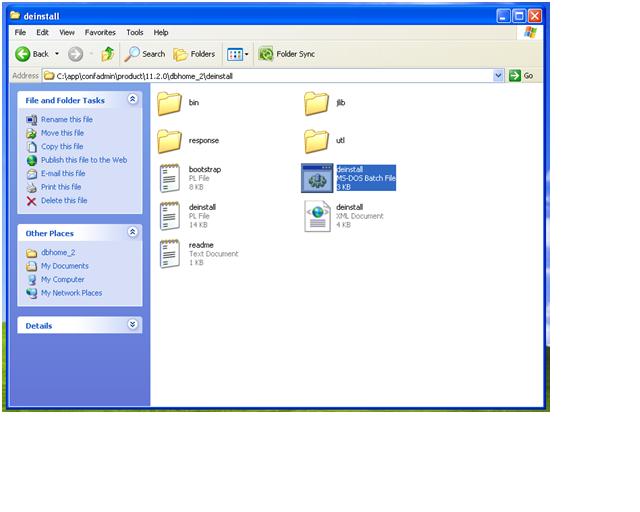
Uninstall / Deinstall Oracle 11g on windows

How to deinstall Oracle11g on windows system.
Step:
Oracle11g introduce new utility "deinstall" to uninstall/deinstall oracle database with configuration files.

run deinstall.bat file $ORACLE_HOME/deinstall/deinstall.bat
and give the prompt details then system will remove all the related files/services/folder.

if oci.dll not delete during deinstall process then restart system and delete manually.


Tuesday, September 13, 2011

ORA-24247: network access denied by access control list (ACL)

In oracle 11gr1 or higher version new security policy implemented.
while executing UTL_SMTP package received following error message:


ORA-24247: network access denied by access control list (ACL)

Reason : New security policy implemented.

Solution:
1. Login with SYSDBA user
2. create procedure
3. grant access to particular user.

[oracle@fakorapd bin]$ ./sqlplus / as sysdba

SQL*Plus: Release 11.2.0.1.0 Production on Mon Sep 12 17:20:14 2011

Copyright (c) 1982, 2009, Oracle.  All rights reserved.


Connected to:
Oracle Database 11g Enterprise Edition Release 11.2.0.1.0 - Production
With the Partitioning, OLAP, Data Mining and Real Application Testing options

SQL> set serveroutput on

SQL> SQL> show user
USER is "SYS"

SQL> create or replace procedure mailserver_acl(
  aacl       varchar2,
  2    3    acomment   varchar2,
  4    aprincipal varchar2,
  5    aisgrant   boolean,
  6    aprivilege varchar2,
  7    aserver    varchar2,
  8    aport      number)
  9  is
 10  begin
  begin
 11   12      DBMS_NETWORK_ACL_ADMIN.DROP_ACL(aacl);
 13       dbms_output.put_line('ACL dropped.....');
 14    exception
 15      when others then
 16        dbms_output.put_line('Error dropping ACL: '||aacl);
      dbms_output.put_line(sqlerrm);
 17   18    end;
 19    begin
 20      DBMS_NETWORK_ACL_ADMIN.CREATE_ACL(aacl,acomment,aprincipal,aisgrant,apr                                                                             ivilege);
 21      dbms_output.put_line('ACL created.....');
 22    exception
 23      when others then
 24        dbms_output.put_line('Error creating ACL: '||aacl);
 25        dbms_output.put_line(sqlerrm);
 26    end;
 27    begin
 28      DBMS_NETWORK_ACL_ADMIN.ASSIGN_ACL(aacl,aserver,aport);
 29      dbms_output.put_line('ACL assigned.....');
 30    exception
 31      when others then
 32        dbms_output.put_line('Error assigning ACL: '||aacl);
 33        dbms_output.put_line(sqlerrm);
 34    end;
 35    commit;
 36    dbms_output.put_line('ACL commited.....');
 37  end;
 38  /

Procedure created.

SQL> show errors
No errors.


SQL> begin
  mailserver_acl(
    'mailserver_acl.xml',
    'ACL for used Email Server to connect',
    'OEMSYS', --(user name/schema)
    TRUE,
    'connect',
    'fakexc.dummy.local', --(your exchange mail server name)
    25); --default port number
end;
/  2    3    4    5    6    7    8    9   10   11
/


Error dropping ACL: mailserver_acl.xml
ORA-31001: Invalid resource handle or path name "/sys/acls/mailserver_acl.xml"
ACL created.....
ACL assigned.....
ACL commited.....

PL/SQL procedure successfully completed.


NOTE: 
1. ORA-31001 can be ignore first time, because procedure first drop then create ACL.
2. Replace above Italic value as per your environment.


Monday, September 12, 2011

Flashback Data Archive (Total Recall) 11gr2

Today i am going to write about Flashback data archive feature introduced in the Oracle 11gr1.

FAQ's
1. What is Flashback data archive?
A. Flashback data archive is a feature to track all the transaction changes over life time on a tables. ( it is like AUDITING without additional configuration).

2. Is it available in oracle 10g?
A. No, this feature is introduced in Oracle 11g.

3. What privileges required to enable FLASHBACK DATA ARCHIVE FEATUER?
A. Flash archive object privilege required to enable flashback data archive. 

4. How to configure FLASHBACK DATA ARCHIVE?
A. see the below live example

5. By default FLASHBACK ARCHIVE is enable or disable?
A. By default flashback archive is off for a table.

6. How to get details about FLASHBACK DATA ARCHIVE?
A. There are data dictionary view available in the system , from there we can get the details:


Table 12-3 Static Data Dictionary Views for Flashback Data Archive Files
ViewDescription
*_FLASHBACK_ARCHIVEDisplays information about Flashback Data Archive files.
*_FLASHBACK_ARCHIVE_TSDisplays tablespaces of Flashback Data Archive files.
*_FLASHBACK_ARCHIVE_TABLESDisplays information about tables that are enabled for Data Flashback Archive files.

Live Example:
Step:
1. create separate tablespace for flashback
2. create flashback data archive and assigned default tablespace and quota.
3. Enable flashback data archive for tables
4. Viewing flashback data archive


SQL> conn sys/oracle as sysdba
Connected.
SQL> create tablespace FLASHBACK
  2  datafile 'd:\app\administrator\oradata\fakpropr\flashback01.dbf' size 1g
  3  autoextend on;


Tablespace created.


SQL> --create flashback archive
SQL> create flashback archive default fp_pr_flash tablespace flashback
  2  quota 10g retention 10 year;


Flashback archive created.


SQL> --ENABLE FLASHBACK ARCHIVE ON THE FOLLOWING  HR TABLES


SQL> alter table fgc.PMTERMINATIONS flashback archive;


Table altered.


SQL> alter table fgc.PMSALARYDTLSUB flashback archive;


Table altered.


SQL> alter table fgc.PMSALARYDTL flashback archive;


Table altered.


SQL> alter table fgc.PMSALARYMSTR flashback archive;


Table altered.


SQL> alter table fgc.PMLOAN flashback archive;


Table altered.


SQL> alter table fgc.PMEMPLOYEE flashback archive;


Table altered.


SQL> alter table fgc.PMANULLEAVES flashback archive;


Table altered.


SQL> alter table fgc.PMADVANCE flashback archive;


Table altered.


SQL> alter table fgc.PMADDITION flashback archive;


Table altered.


--Viewing FLASHBACK DATA ARCHIVE DETAILS
1. Displays information about data archive files


SQL> column owner_name format a20
SQL> column flashback_archive_name format a30
SQL> select owner_name,flashback_archive_name,retention_in_days,status
  2  from dba_flashback_archive;


OWNER_NAME           FLASHBACK_ARCHIVE_NAME         RETENTION_IN_DAYS STATUS
-------------------- ------------------------------ ----------------- -------
SYS                  FP_PR_FLASH                                 3650 DEFAULT


In the above query output : FLASHBACK ARCHIVE NAME : FP_PR_FLASH / OWNER IS SYS AND RETENTION IS 3650 DAYS (10 YEARS)


2. Displays TABLESPACES OF FLASHBACK data archive files

SQL> column quota_in_mb format a20
SQL> column flashback_archive_name format a30
SQL> column tablespace_name format a20
SQL> select flashback_archive_name,tablespace_name,quota_in_mb
  2  from dba_flashback_archive_ts;


FLASHBACK_ARCHIVE_NAME         TABLESPACE_NAME      QUOTA_IN_MB
------------------------------ -------------------- --------------------
FP_PR_FLASH                    FLASHBACK            10240

In the above query output: Tablespace which is used for flashback data archive is "FLASHBACK" and allocated space on tablespace is 10240 MB (10GB).

3. Displays information about TABLEs that are enabled for flashback data archive files

SQL> column flashback_archive_name format a15
SQL> column owner_name format a10
SQL> column table_name format a15
SQL> column archive_table_name format a20
SQL> select table_name,owner_name,flashback_archive_name,archive_table_name
  2  from dba_flashback_archive_tables;

TABLE_NAME      OWNER_NAME FLASHBACK_ARCHI ARCHIVE_TABLE_NAME
--------------- ---------- --------------- --------------------
PMTERMINATIONS  FGC        FP_PR_FLASH     SYS_FBA_HIST_52126
PMSALARYDTLSUB  FGC        FP_PR_FLASH     SYS_FBA_HIST_52114
PMSALARYDTL     FGC        FP_PR_FLASH     SYS_FBA_HIST_52110
PMSALARYMSTR    FGC        FP_PR_FLASH     SYS_FBA_HIST_52119
PMLOAN          FGC        FP_PR_FLASH     SYS_FBA_HIST_52096
PMEMPLOYEE      FGC        FP_PR_FLASH     SYS_FBA_HIST_52086
PMANULLEAVES    FGC        FP_PR_FLASH     SYS_FBA_HIST_52074
PMADVANCE       FGC        FP_PR_FLASH     SYS_FBA_HIST_52069
PMADDITION      FGC        FP_PR_FLASH     SYS_FBA_HIST_52058

9 rows selected.

In the above query output table name is a tables where data archive is enabled. owner is a owner of the tables and archive table name (last column) is system generated tables name for archive details for each base table.

Important notes:

DDL Statements on Tables Enabled for Flashback Data Archive

Flashback Data Archive supports many DDL statements, including some that alter the table definition or move data. For example:
  • ALTER TABLE statement that does any of the following:
    • Adds, drops, renames, or modifies a column
    • Adds, drops, or renames a constraint
    • Drops or truncates a partition or subpartition operation
  • TRUNCATE TABLE statement
  • RENAME statement that renames a table
Some DDL statements cause error ORA-55610 when used on a table enabled for Flashback Data Archive. For example:
  • ALTER TABLE statement that includes an UPGRADE TABLE clause, with or without an INCLUDING DATA clause
  • ALTER TABLE statement that moves or exchanges a partition or subpartition operation
  • DROP TABLE statement
If you must use unsupported DDL statements on a table enabled for Flashback Data Archive, use the DBMS_FLASHBACK_ARCHIVE.DISASSOCIATE_FBA procedure to disassociate the base table from its Flashback Data Archive. To reassociate the Flashback Data Archive with the base table afterward, use the DBMS_FLASHBACK_ARCHIVE.REASSOCIATE_FBA procedure.


General Guidelines for Oracle Flashback Technology

  • Use the DBMS_FLASHBACK.ENABLE and DBMS_FLASHBACK.DISABLE procedures around SQL code that you do not control, or when you want to use the same past time for several consecutive queries.
  • Use Oracle Flashback Query, Oracle Flashback Version Query, or Oracle Flashback Transaction Query for SQL code that you write, for convenience. An Oracle Flashback Query, for example, is flexible enough to do comparisons and store results in a single query.
  • To obtain an SCN to use later with a flashback feature, use DBMS_FLASHBACK.GET_SYSTEM_CHANGE_NUMBER.
  • To compute or retrieve a past time to use in a query, use a function return value as a time stamp or SCN argument. For example, add or subtract an INTERVAL value to the value of the SYSTIMESTAMP function.
  • Use Oracle Flashback Query, Oracle Flashback Version Query, and Oracle Flashback Transaction Query locally or remotely. An example of a remote Oracle Flashback Query is:
    (SELECT * FROM employees@some_remote_host AS OF 
        TIMESTAMP (SYSTIMESTAMP - INTERVAL '60' MINUTE);
    
  • To ensure database consistency, always perform a COMMIT or ROLLBACK operation before querying past data.
  • Remember that all flashback processing uses the current session settings, such as national language and character set, not the settings that were in effect at the time being queried.
  • Remember that DDLs that alter the structure of a table (such as drop/modify column, move table, drop partition, truncate table/partition, and add constraint) invalidate any existing undo data for the table. If you try to retrieve data from a time before such a DDL executed, error ORA-01466 occurs. DDL operations that alter the storage attributes of a table (such as PCTFREEINITRANS, and MAXTRANS) do not invalidate undo data.
  • To query past data at a precise time, use an SCN. If you use a time stamp, the actual time queried might be up to 3 seconds earlier than the time you specify. Oracle Database uses SCNs internally and maps them to time stamps at a granularity of 3 seconds.
    For example, suppose that the SCN values 1000 and 1005 are mapped to the time stamps 8:41 AM and 8:46 AM, respectively. A query for a time between 8:41:00 and 8:45:59 AM is mapped to SCN 1000; an Oracle Flashback Query for 8:46 AM is mapped to SCN 1005. Therefore, if you specify a time that is slightly after a DDL operation (such as a table creation) Oracle Database might use an SCN that is just before the DDL operation, causing error ORA-01466.
  • You cannot retrieve past data from a dynamic performance (V$) view. A query on such a view always returns current data.
  • You can perform queries on past data in static data dictionary views, such as *_TABLES.

Performance Guidelines for Oracle Flashback Technology

  • Use the DBMS_STATS package to generate statistics for all tables involved in an Oracle Flashback Query. Keep the statistics current. Oracle Flashback Query uses the cost-based optimizer, which relies on these statistics.
  • Minimize the amount of undo data that must be accessed. Use queries to select small sets of past data using indexes, not to scan entire tables. If you must scan a full table, add a parallel hint to the query.
    The performance cost in I/O is the cost of paging in data and undo blocks that are not in the buffer cache. The performance cost in CPU use is the cost of applying undo information to affected data blocks. When operating on changes in the recent past, flashback operations are CPU-bound.
  • For Oracle Flashback Version Query, use index structures. Oracle Database keeps undo data for index changes and data changes. Performance of index lookup-based Oracle Flashback Version Query is an order of magnitude faster than the full table scans that are otherwise needed.
  • In an Oracle Flashback Transaction Query, the xid column is of the type RAW(8). To take advantage of the index built on the xid column, use the HEXTORAW conversion function: HEXTORAW(xid).
  • A Oracle Flashback Query against a materialized view does not take advantage of query rewrite optimization.

    Reference : http://download.oracle.com/docs/cd/E11882_01/appdev.112/e17125/adfns_flashback.htm#BJFBCABH

Thursday, September 8, 2011

Enterprise Manager is not able to connect to the database instance. The state of the components are listed below.

Today when i try to connect to Oracle Enterprise Manager in 11gr2 on widows server then got below message

Enterprise Manager is not able to connect to the database instance. The state of the components are listed below.
to check what could be the reason i check emoms.trc file located under
%ORACLE_HOME%\hostname.domainname_dbname\sysman\log\emoms.trc
and found the following error
[SystemThreadGroup-8] ERROR app.SessionObjectManager sessionDestroyed.128 - java.sql.SQLException: ORA-28000: the account is locked

java.sql.SQLException: ORA-28000: the account is locked

After that i checked locked account in db and found the following two account is locked.
1. SYSTEM / 2. SYSMAN
SQL> select username,account_status from dba_users
  2  where account_status ='LOCKED';

USERNAME                       ACCOUNT_STATUS
------------------------------ --------------------------------
SYSTEM                         LOCKED
SYSMAN                         LOCKED

Once i unlocked the account EM working fine

SQL> alter user SYSMAN account unlock;

User altered.