Search This Blog

Showing posts with label Oracle on UNIX. Show all posts

Sunday, September 25, 2011

HOW TO configure vnc server and client on linux machine

Dear All,

This is one of the common task DBA needs to do :
1. HOW TO access linux server from windows machine remotely?
2. HOW TO configure vnc server on linux machine

Answer of question 1,2:
Step: 

1. Download and install vnc client version on windows machine here
2. logon to linux machine with root
3. check vnc rpm required package is installed or not
4. add a user to vnc server file
5. setting password for vnc access
6. start vnc server

login as: root
root@192.168.100.9's password:
Last login: Sun Sep 25 12:29:14 2011 from 192.168.104.114
[root@fakorapd ~]# rpm -qa | grep vnc
vnc-server-4.1.2-9.el5
[root@fakorapd ~]# cat /etc/sysconfig/vncservers
# The VNCSERVERS variable is a list of display:user pairs.
#
# Uncomment the lines below to start a VNC server on display :2
# as my 'myusername' (adjust this to your own).  You will also
# need to set a VNC password; run 'man vncpasswd' to see how
# to do that.
#
# DO NOT RUN THIS SERVICE if your local area network is
# untrusted!  For a secure way of using VNC, see
# .

# Use "-nolisten tcp" to prevent X connections to your VNC server via TCP.

# Use "-nohttpd" to prevent web-based VNC clients connecting.

# Use "-localhost" to prevent remote VNC clients connecting except when
# doing so through a secure tunnel.  See the "-via" option in the
# `man vncviewer' manual page.

# VNCSERVERS="2:myusername"
# VNCSERVERARGS[2]="-geometry 800x600 -nolisten tcp -nohttpd -localhost"
[root@fakorapd ~]# vi /etc/sysconfig/vncservers
[root@fakorapd ~]# vncpasswd
Password:
Verify:
[root@fakorapd ~]# vncserver :1
xauth:  creating new authority file /root/.Xauthority

New 'fakorapd.fakhruddin.local:1 (root)' desktop is fakorapd.fakhruddin.local:1

Creating default startup script /root/.vnc/xstartup
Starting applications specified in /root/.vnc/xstartup
Log file is /root/.vnc/fakorapd.fakhruddin.local:1.log

[root@fakorapd ~]# cd
[root@fakorapd ~]# cd .vnc/
[root@fakorapd .vnc]# cat xstartup
#!/bin/sh

# Uncomment the following two lines for normal desktop:
# unset SESSION_MANAGER
# exec /etc/X11/xinit/xinitrc

[ -x /etc/vnc/xstartup ] && exec /etc/vnc/xstartup
[ -r $HOME/.Xresources ] && xrdb $HOME/.Xresources
xsetroot -solid grey
vncconfig -iconic &
xterm -geometry 80x24+10+10 -ls -title "$VNCDESKTOP Desktop" &
twm &
[root@fakorapd .vnc]# vi xstartup
[root@fakorapd .vnc]# vncserver -kill :1
Killing Xvnc process ID 9881
[root@fakorapd .vnc]# vncserver :1

New 'fakorapd.dummy.local:1 (root)' desktop is fakorapd.dummy.local:1

Starting applications specified in /root/.vnc/xstartup
Log file is /root/.vnc/fakorapd.dummy.local:1.log

[root@fakorapd .vnc]#


---you will see grey color screen but not colorful :) in linux server , because we have started xserver , comment out below lines from xstartup file---

[root@fakorapd ~]# cd .vnc/
[root@fakorapd .vnc]# cat xstartup
#!/bin/sh

# Uncomment the following two lines for normal desktop:
# unset SESSION_MANAGER
# exec /etc/X11/xinit/xinitrc

[ -x /etc/vnc/xstartup ] && exec /etc/vnc/xstartup
[ -r $HOME/.Xresources ] && xrdb $HOME/.Xresources
xsetroot -solid grey
vncconfig -iconic &
xterm -geometry 80x24+10+10 -ls -title "$VNCDESKTOP Desktop" &
twm &
[root@fakorapd .vnc]# vi xstartup
[root@fakorapd .vnc]# vncserver -kill :1
Killing Xvnc process ID 9881
[root@fakorapd .vnc]# vncserver :1

New 'fakorapd.dummy.local:1 (root)' desktop is fakorapd.dummy.local:1

Starting applications specified in /root/.vnc/xstartup
Log file is /root/.vnc/fakorapd.dummy.local:1.log

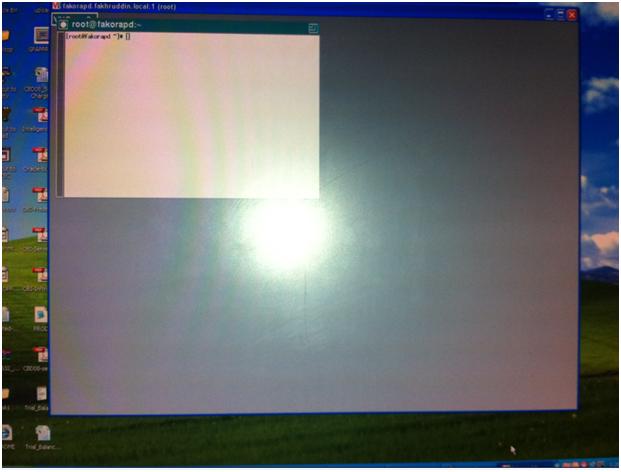
after that you will be able to see color ful desktop of linux server as below.

Saturday, September 17, 2011

Enable auditing for SYSDBA (sys) user in 11gr2

Database security is one of the major and important task for DBA's. ,
this article is basic of enabling auditing for SYS administrative user.

1. How to enable AUDIT for sys administrative user.

Step:
1. logon to database with sysdba user
2. set AUDIT_SYS_OPERATIONS parameter (mandatory) to TRUE
default value of this parameter is FALSE
This parameter is static means we required to bounce DATABASE to take effect of this parameter value.

3. set AUDIT_TRAIL parameter as per desired value.
default value of this parameter is none

4. set AUDIT_FILE_DEST = location path for audit records log file 
default value of this parameter %ORACLE_BASE%/ORACLE_SID/adump
IF AUDIT_FILE_DEST parameter doesn't set or not point to valid directory then oracle will create audit file in %ORACLE_HOME%/rdbms/audit directory.

5. restart database

6. Setting the size or age of the operating system audit files


Example:
[oracle@recovery bin]$ ./sqlplus / as sysdba

SQL*Plus: Release 11.2.0.1.0 Production on Sat Sep 17 21:46:36 2011

Copyright (c) 1982, 2009, Oracle.  All rights reserved.


Connected to:
Oracle Database 11g Enterprise Edition Release 11.2.0.1.0 - Production
With the Partitioning, OLAP, Data Mining and Real Application Testing options

SQL> alter system set audit_sys_operations=TRUE scope=spfile;

System altered.

SQL> alter system set audit_trail='DB' scope=spfile;

System altered.

SQL> alter system set audit_file_dest='/db/admin/oramfe/adump/' scope=spfile;

System altered.

SQL> shutdown immediate
Database closed.
Database dismounted.
ORACLE instance shut down.

SQL> startup
ORACLE instance started.

Total System Global Area 2042241024 bytes
Fixed Size                  1337548 bytes
Variable Size             973080372 bytes
Database Buffers         1056964608 bytes
Redo Buffers               10858496 bytes
Database mounted.
Database opened.
SQL> host ls -lrt /db/admin/oramfe/adump/
total 32
-rw-rw---- 1 oracle oracle 2585 Sep 17 21:48 oramfe_ora_12487_1.aud
-rw-rw---- 1 oracle oracle  750 Sep 17 21:48 oramfe_ora_12500_2.aud
-rw-rw---- 1 oracle oracle 1451 Sep 17 21:50 oramfe_ora_12602_1.aud
-rw-rw---- 1 oracle oracle  980 Sep 17 21:51 oramfe_ora_12671_1.aud

SQL> host cat /db/admin/oramfe/adump/oramfe_ora_12671_1.aud
Audit file /db/admin/oramfe/adump/oramfe_ora_12671_1.aud
Oracle Database 11g Enterprise Edition Release 11.2.0.1.0 - Production
With the Partitioning, OLAP, Data Mining and Real Application Testing options
ORACLE_HOME = /db/product/11.2.0/dbhome_1/
System name:    Linux
Node name:      recovery.fakhruddin.local
Release:        2.6.18-53.el5
Version:        #1 SMP Wed Oct 10 16:34:02 EDT 2007
Machine:        i686
Instance name: oramfe
Redo thread mounted by this instance: 1
Oracle process number: 20
Unix process pid: 12671, image: oracle@recovery.fakhruddin.local (TNS V1-V3)

Sat Sep 17 21:50:07 2011 +04:00
LENGTH : '160'
ACTION :[7] 'CONNECT'
DATABASE USER:[1] '/'
PRIVILEGE :[6] 'SYSDBA'
CLIENT USER:[6] 'oracle'
CLIENT TERMINAL:[5] 'pts/0'
STATUS:[1] '0'
DBID:[10] '3012735072'

Sat Sep 17 21:51:21 2011 +04:00
LENGTH : '173'
ACTION :[19] 'ALTER DATABASE OPEN'
DATABASE USER:[1] '/'
PRIVILEGE :[6] 'SYSDBA'
CLIENT USER:[6] 'oracle'
CLIENT TERMINAL:[5] 'pts/0'
STATUS:[1] '0'
DBID:[10] '3012735072'

On windows platform the audit records will captured in the event viewer log file.

start --->> control penals >>> administrative tools >>> event viewer >>>> application log


Thursday, February 8, 2007

Starting and Stopping Oracle Software

Wednesday, February 7, 2007

Administering

Overview
In Oracle Database files and programs, a question mark (?) represents the value of the ORACLE_HOME environment variable.
the @ sign represents the ORACLE_SID environment variable

Environment Variables
To display the current value of an environment variable,
$ env | more
NLS_LANG
Specifies the language, territory, and character set of the client environment
language_territory.characterset
ORA_NLS10
Specifies the directory where language, territory, character set, and linguistic definition files are stored.
$ORACLE_HOME/nls/data
ORA_TZFILE
Specifies the full path and file name of the time zone file
$ORACLE_HOME/oracore/zoneinfo/timezlrg.dat >>>> DEFAULT
ORACLE_BASE
Specifies the base of the Oracle directory structure for Optimal Flexible Architecture (OFA) compliant installations
/u01/app/oracle
ORACLE_HOME
Specifies the directory containing the Oracle software.
$ORACLE_BASE/product/10.1.0
ORACLE_PATH
/u01/app/oracle/product/10.1.0/bin:.
ORACLE_SID
Specifies the Oracle system identifier
ORCL
ORACLE_TRACE
Enables the tracing of shell scripts during an installation
ORAENV_ASK
Controls whether the oraenv or coraenv script prompts for the value of the ORACLE_SID environment variable.
Value : NO or Any others.
SQLPATH
Specifies the directory or list of directories that SQL*Plus searches for a login.sql file.
/home:/home/oracle:/u01/oracle
TNS_ADMIN
Specifies the directory containing the Oracle Net Services configuration files
$ORACLE_HOME/network/admin
TWO_TASK
Specifies the default connect identifier to use in the connect string
Any connect identifier

UNIX Environment Variables
ADA_PATH (AIX only)
Specifies the directory containing the Ada compiler
/usr/lpp/powerada
CLASSPATH
Used with Java applications
There is no default setting. CLASSPATH must include the following directories:
$ORACLE_HOME/JRE/lib:$ORACLE_HOME/jlib
DISPLAY
Used by X-based tools. Specifies the display device used for input and output.
hostname:server[.screen]
where the hostname is the system name (either IP address or alias), server is the sequential code number for the server, and screen is the sequential code number for the screen. If you have a single monitor, use the value 0 for both server and screen (0.0).
Note: If you have a single monitor, screen is optional.

Example 135.287.222.12:0.0 bambi:0
HOME
The user’s home directory
/home/oracle

PATH
Used by the shell to locate executable programs; must include the $ORACLE_HOME/bin directory.
[oracle@alwarid-taj ~]$ echo $PATH
/usr/kerberos/bin:/usr/local/bin:/usr/bin:/bin:/usr/X11R6/bin:/home/oracle/bin


Setting a Common Environment


set a common operating system environment by using the oraenv or coraenv scripts
1.For the Bourne, Bash, or Korn shell, use the oraenv command.
2.For the C shell, use the coraenv command.

The oraenv and coraenv scripts are created during installation. These scripts set environment variables based on the contents of the oratab file and provide:


Note:

Do not call the oraenv or coraenv script from the Oracle software owner (typically oracle) user's shell startup script. Because these scripts prompt for values, they can prevent the dbstart script from starting a database automatically when the system starts.


The oraenv or coraenv script is usually called from the user's shell startup file (for example .profile or.login). It sets the ORACLE_SID and ORACLE_HOME environment variables and includes the $ORACLE_HOME/bin directory in the PATH environment variable setting.


When switching between databases, users can run the oraenv or coraenv script to set these environment variables.

[oracle@alwarid-taj /]$ su - root
Password:
[root@alwarid-taj ~]# . /usr/local/bin/oraenv
ORACLE_SID = [root] ? oracle
[root@alwarid-taj ~]#


Local bin Directory

1.When you run the root.sh script after installation, the script prompts you for the path of the local bin directory and automatically copies the oraenv, coraenv, and dbhome scripts to the directory that you specify. The default local bin directory is /usr/local/bin.

2.If you do not run the root.sh script, then you can manually copy the oraenv or coraenv and dbhome scripts from the $ORACLE_HOME/bin directory to the local bin directory.


The oraenv or coraenv script is usually called from the user's shell startup file (for example .profile or.login).